
Start with meeting summarization or support ticket triage. Invoice processing can offer measurable savings but needs human approval for exceptions. Keep contract signatures and payment authorization under human control.
-
$10-$19/user/monthWhat Fathom and Fireflies.ai cost for the safest AI pilot: meeting summarization
-
85-95% routing accuracyWhat AI ticket triage hits on mature deployments versus 40-50% for rules-based systems
-
$2.36-$2.78 per invoiceAI invoice processing cost versus $12.88-$19.83 manually: the clearest ROI benchmark in process automation
-
5-8x price gapn8n versus Zapier at 10,000 workflow runs per month: platform choice is a financial decision
-
99.9% vs. 80%Human-in-the-loop accuracy versus fully automated AI: the gap that makes rank 9 a non-starter
-
40%+ canceled by 2027Gartner's projection for agentic AI projects, primarily due to inadequate risk controls
-
58% review time cutIDC benchmark for AI document summarization on 34-page research reports
-
30-50% faster month-end closeWhat AI-driven anomaly detection delivers on financial reconciliation workflows
Most AI automation failures stem from picking the wrong workflow, not the wrong tool. Start with processes that have clear inputs, repeatable decisions, and accessible data. Gartner warns 40%+ of agentic AI projects will be canceled by 2027 due to inadequate risk controls.
Jump to
- 011. Meeting Summarization and Action-Item Extraction
- 022. Support Ticket Triage and Routing
- 033. Internal Request Routing and Approval Reminders
- 044. AI Invoice Processing and Three-Way Matching
- 055. Document Summarization and Report Digests
- 066. Lead Enrichment and CRM Data Entry Automation
- 077. AI-Powered Financial Reporting and Reconciliation Checks
- 088. Employee Onboarding Workflow Automation
- 099. Autonomous AI Agents for Contract Approval and Payment Authorization

Meeting Summarization and Action-Item Extraction
Visit website ↗Meeting summarization is the lowest-risk AI automation category. Fathom and Fireflies.ai deploy in under an hour, cost $10-$19 per user per month, and require only a transcript as input.
Best for
- Operations and project teams running 10+ recurring meetings per week
- Sales teams needing CRM-ready call summaries auto-pushed to HubSpot or Salesforce
- Any organization paying a coordinator to handle manual note-taking on repetitive tasks
- Teams that lose action items between meeting and follow-up email
Watch-outs
- Accuracy drops on heavy accents or poor audio; route low-confidence outputs to human review
- Action-item extraction misses implied commitments; train reviewers to scan, not just accept
- CRM integration requires a second automation layer via Zapier or n8n
- Sensitive meetings (legal, HR, M&A) need access controls and retention policies before automating
Bottom line
Fathom and Fireflies.ai: under an hour to deploy, $10-$19/user/month, 30-60 minutes of note-taking eliminated per meeting.
Support Ticket Triage and Routing
Visit website ↗AI ticket triage reaches 85-95% routing accuracy on mature deployments versus 40-50% for rules-based systems. The AI classifies, tags, and routes; agents handle resolution.
Best for
- Support teams handling 200+ tickets per month across multiple queues
- Companies with a tiered support structure (L1/L2/L3) where misrouting creates SLA failures
- Businesses with seasonal volume spikes that overwhelm manual triage
- Teams using Zendesk or Freshdesk, which have native AI triage in their 2026 plans
Watch-outs
- Cold-start accuracy is ~70%, not 95%; mature performance requires 3-6 months of labeled history
- Routing AI should never auto-close tickets; human review before resolution is non-negotiable
- Multi-language queues need separate model training per language or accuracy degrades sharply
- Tickets below 80% confidence must escalate automatically to a human queue
Bottom line
AI triage hits 85-95% accuracy versus a 50% rules-based ceiling. Start with classification and routing only; keep resolution human.
Internal Request Routing and Approval Reminders
Visit website ↗Internal request routing offers structured inputs, bounded decisions, and zero customer-facing risk. AI classifies the request type, routes it to the correct queue, and sends reminders when approvals stall. n8n Pro costs $50/month versus Zapier's $250-$400 for the same 10,000-run volume.
Best for
- Operations teams processing 50+ internal requests per week across disconnected systems
- Companies where approval bottlenecks regularly delay project starts
- Teams on Slack or Microsoft Teams can use lightweight workflow bots without new tooling
- Businesses wanting to build automation infrastructure before tackling customer-facing workflows
Watch-outs
- Ambiguous form fields produce poor routing accuracy; clear request categories are required
- Tune reminder cadence carefully: too aggressive and managers ignore it; too infrequent and bottlenecks persist
- n8n self-hosted is free but needs DevOps capacity; Zapier is faster but costs 5-8x more at scale
- This workflow should recommend and remind only; never auto-approve purchases or access changes
Bottom line
Cuts approval cycle time 40-60% on high-volume queues. Build this before anything customer-facing.
AI Invoice Processing and Three-Way Matching
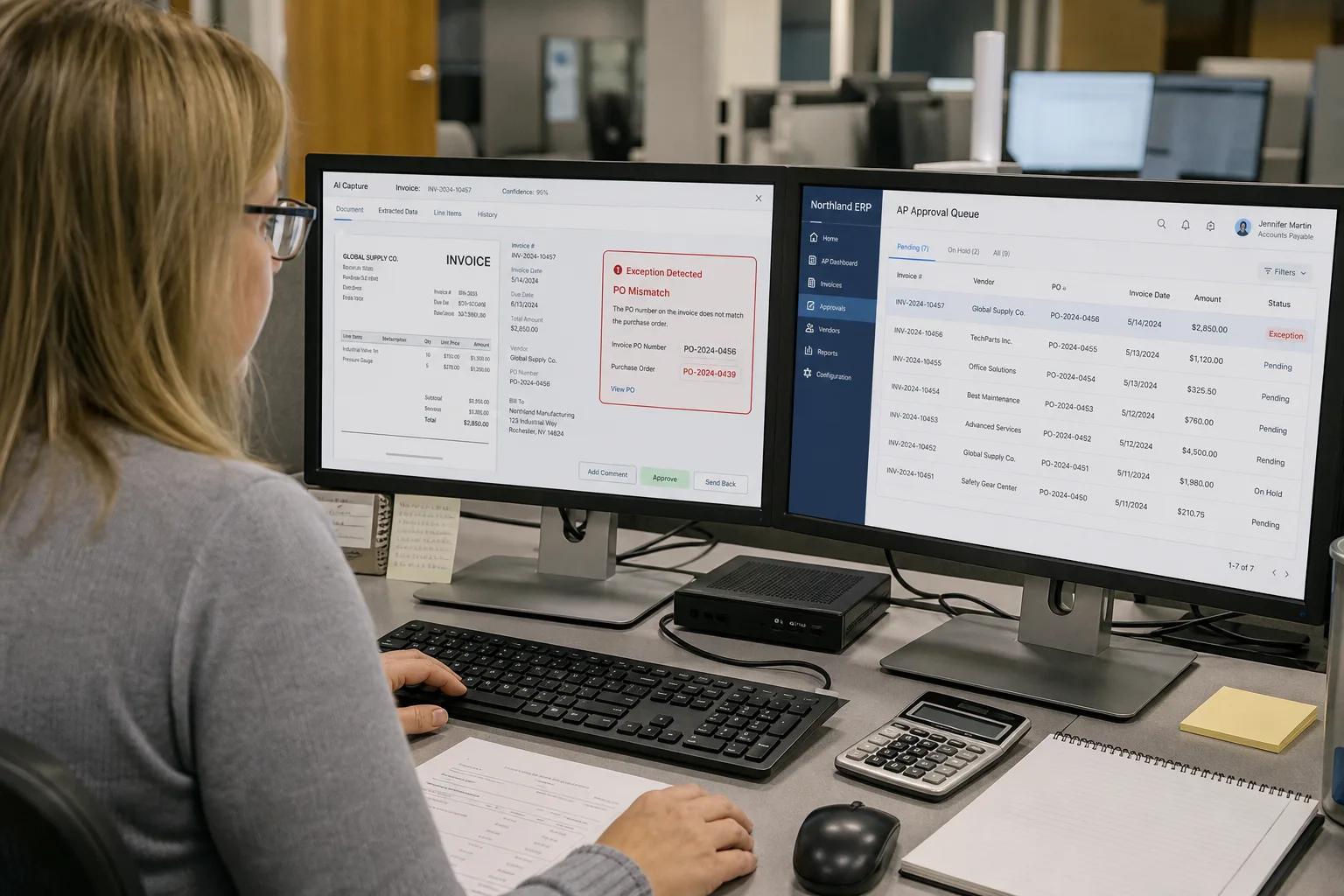
Visit website ↗AI invoice processing cuts cost-per-invoice from $12.88-$19.83 to $2.36-$2.78 and drops error rates from 39% to below 0.1%. Three-way matching falls from 15-30 minutes to under five seconds. Remaining exceptions still require human review.
Best for
- AP teams processing 200+ invoices per month where manual data entry costs $28,500 per employee annually
- Businesses with high PO-based procurement where three-way matching is mandatory
- Companies running SAP, NetSuite, or QuickBooks with API-accessible purchase orders and receipt data
- Finance teams that want intelligent process automation to cut month-end close time
Watch-outs
- PO mismatches and tax variances must route to a human AP reviewer, not auto-approve
- Generic OCR without fine-tuning underperforms on unusual invoice layouts; vendor-specific training improves accuracy
- Duplicate-invoice detection requires cross-system data access; siloed ERP instances create blind spots
- AI flags and extracts; humans approve all disbursements. Fully automated payment approval is a governance failure.
Bottom line
$2.36-$2.78 cost per invoice versus $12.88-$19.83 manually; three-way matching in under five seconds. Automate extraction and matching; gate payment on human approval.
Document Summarization and Report Digests
Visit website ↗AI document summarization reduces review time by 58% on 34-page reports (IDC 2024). For legal teams, AI contract review delivers 60-80% review-time reduction with 94% clause-identification accuracy. Document understanding is a strong use case; document approval is not.
Best for
- Legal and procurement teams reviewing 20+ contracts or RFPs per month
- Research and strategy teams spending 2+ hours per week digesting industry reports
- Compliance teams that need consistent clause extraction across large document sets
- Operations teams that receive vendor proposals and need structured comparison outputs
Watch-outs
- Nuance and defined terms can drop out of summaries; reviewers must read flagged clauses, not just the digest
- Hallucination risk is real on dense legal text; confidence scoring and source citation are non-negotiable
- Contract intake and clause extraction are suitable for automation; approval requires human sign-off
- Agentic models require 5-30x more tokens per task than standard models (Gartner); token costs add up on long documents
Bottom line
58% reduction in review time (IDC); 188 working days saved per year on 500 contracts. Use AI to extract and flag; use humans to decide.
Lead Enrichment and CRM Data Entry Automation
Visit website ↗Lead enrichment automation eliminates the 10-15 minutes a rep spends researching each inbound lead. AI reads the form, pulls firmographic and tech-stack data, scores against ICP criteria, and writes the CRM record before the rep sees the notification. Stale enrichment data on fast-growth SMBs can create more work than it saves.
Best for
- B2B sales teams receiving 50+ inbound leads per month from web forms
- Marketing ops teams tired of manual list cleaning before email campaigns
- Revenue operations teams that need consistent CRM data quality for pipeline forecasting
- Companies using Clay or Apollo with existing HubSpot or Salesforce integrations
Watch-outs
- Enrichment APIs return stale data on SMBs and fast-growth companies; build a staleness flag and manual-review trigger
- Lead scoring models need quarterly retraining as ICP definitions shift
- Scope CRM write permissions tightly: write to specific fields, not full record access
- GDPR and CCPA compliance requires explicit data-use policies when enrichment pulls personal data from third parties
Bottom line
Cuts lead research from 10-15 minutes per contact to under 60 seconds. Skipping the staleness-check step will generate more manual effort than you removed.
AI-Powered Financial Reporting and Reconciliation Checks
Visit website ↗AI cuts financial close cycle time by 30-50%, flagging anomalies in GL entries, bank reconciliation, and intercompany mismatches. Finance teams review flagged items and approve corrections; they do not delegate that judgment to automated systems.
Best for
- Finance teams spending 3+ days on month-end close due to manual reconciliation
- Multi-entity businesses where intercompany eliminations are a recurring bottleneck
- FP&A teams manually pulling data from disconnected systems into Excel for analysis
- Companies using BlackLine, Planful, or NetSuite with established chart-of-accounts structure
Watch-outs
- AI anomaly detection generates false positives on new account structures; tune thresholds before scaling
- Automated journal entries require dual-control approval; AI can draft, never post without human authorization
- Legacy ERPs without clean API access require RPA as a data-extraction layer before AI analysis is possible
- Every AI-flagged item needs a logged human decision before close; build this into the workflow architecture from day one
Bottom line
30-50% faster month-end close is achievable when AI handles anomaly detection. Hard constraint: automated journal posting without human approval is an audit failure. Design as AI-flags, human-approves from the start.
Employee Onboarding Workflow Automation
Visit website ↗Employee onboarding spans 15-30 steps across HR, IT, finance, and facilities. AI reads offer-letter data, triggers provisioning, schedules orientation, assigns training, and sends completion reminders. Rippling automates 80% of provisioning steps for standard roles; custom or senior hires still need HR review before access is granted.
Best for
- Companies hiring 5+ employees per month where manual onboarding creates IT and HR backlogs
- Businesses with role-based access control frameworks already defined in their identity provider
- HR teams spending 4+ hours per new hire on repetitive provisioning and form-chasing
- Organizations using Rippling, Workday, or BambooHR with existing API integrations
Watch-outs
- Access provisioning for sensitive systems requires manager approval before automation executes
- Multi-system orchestration breaks when one API is down; build fallback alerts and manual override paths
- Compliance training completion must write to an auditable record, not just a Slack message
- Offboarding carries higher risk than onboarding; access revocation must be human-confirmed and logged
Bottom line
Cuts new-hire time-to-productivity 30-40% at companies running 5+ hires per month. AI orchestrates the sequence; humans approve sensitive access grants. Build offboarding automation only after onboarding is stable.
Autonomous AI Agents for Contract Approval and Payment Authorization
Visit website ↗Autonomous AI agents approving contracts or authorizing payments represent the highest-risk automation category, and over 40% of agentic AI projects will be canceled by 2027 (Gartner). Fully automated systems achieve roughly 80% accuracy versus 99.9% for human-in-the-loop workflows. The EU AI Act Article 14, effective August 2026, mandates human oversight for high-risk AI systems affecting financial and legal commitments.
Where AI genuinely helps here
- Contract intake, clause extraction, and risk-flag summarization: AI accelerates review, humans decide
- Payment exception flagging, AI surfaces anomalies, AP manager approves or rejects
- Vendor onboarding checks: AI validates against sanction lists and flags for human review
- Draft generation for standard agreements: AI produces the first draft, legal reviews and signs off
What must stay human
- Contract execution. No autonomous AI agent should hold signature authority
- Payment authorization above any threshold. Dual-control approval is the governance floor
- Vendor master changes (address or bank account) must route to a human with a full audit trail
- When AI confidence is below threshold, the entire decision escalates, not just a flag
Bottom line
Use AI for extraction, summarization, and anomaly detection (60-80% review-time reduction achievable). Autonomous approval authority stays off the table until governance infrastructure is proven.

How to Score Your Own Automation Candidates Before You Commit Budget
Score each process on three factors (1-5 each): Repeatability, Data Access, and Operational Risk. Scores of 12-15 are no-regret pilots. Scores below 7, especially for financial authorization or legal commitment, require human decision authority. High volume and business impact do not offset low repeatability or poor data access. Ship the boring, high-volume, low-risk workflow first, prove the governance model, then move up the risk curve.
Start with clean data, repeatable inputs, and a low cost of failure. Run a contained pilot for 60 days, measuring cycle time, error rate, and exception volume before expanding.